
Why I overexpose my photographs (….most of the time)

Photography is an art form.
It’s important to say that. For some reason, this fact seems to get lost in lots of discussions about photography.
Let me start by saying that I believe there is no such thing as the “Right Way” or the “Wrong Way” to create photographs. If the equipment, techniques, software, and process you use create the photographs you want to make, then you’re doing it right. End of story. It doesn’t matter what anyone else says or thinks.
Like many other art forms, photography relies on the tools we choose and how they work. What\’s more important is how we use, or elect not to use, those tools.
We don’t all shoot the same. We have different reasons for shooting. Different artistic aesthetics. Different philosophical thoughts on how to approach the medium.
Nothing I’m about to say here is intended as a criticism of another photographer’s approach or technique. It’s meant as an explanation of why I shoot the way I do. I also hope it will spark discussion and experimentation.
A few things about how and what I do.
- I abandoned film photography when I bought my first digital camera in 2001. My darkroom equipment now sits in storage.
- As a portrait studio owner, I primarily shoot for clients. My goal is to make them happy. I also pursue personal projects on topics I enjoy, even though they probably won’t generate any income. These projects exist to bring me happiness.
- I shoot with Canon cameras, currently the R5. I appreciate the design and operation of Canon cameras. Their menu architecture has always felt intuitive to me. Like all digital cameras, they offer benefits and disadvantages.
- I shoot in RAW format.
- I post-process my images using Lightroom and Photoshop. To me, photography involves a two-part process: shooting and developing. I likely think this way because I started with film. Digital photographs require development in some form. We can either use the camera’s computer or process the images with software on a laptop or desktop. I choose to process on my laptop or desktop.
- I shoot with the assumption that every photograph will become a 20×30 print hanging on a wall somewhere, even though most of them don’t.
Now that I’ve covered the basics, let’s dive into the heart of this discussion – overexposing.

Expose to the Right
The technique is called ‘Expose to the Right’ (ETTR) and has been around since digital photography became a mainstream thing. The approach has two basic parts.
- When you shoot, overexpose the image as much as possible without losing any important detail. This is super critical. More on it in a minute.
- In post-processing (Lightroom in my case), darken the image to the brightness you desire.
Wait….Why? What the What?
It may seem silly to overexpose when shooting just to darken the image during processing. However, this technique helps create digital image files with richer gradients, less noise, and more detail in the darker parts of the photo.
The concept revolves around how digital cameras capture, convert, and store light data. To illustrate this, I’ll use my Canon R5 as an example. This camera offers a 14-stop dynamic range and produces 14-bit image files. Nikon, Sony, Panasonic, Leica, and Olympus also manufacture camera bodies with similar performance.
Bit Depth and Why It Matters
The ‘14-bit’ item is important. It determines how many tonal shades from black (without detail) to white (without detail) the camera can create and store. A 14-bit camera can produce 16,384 shades of gray from pure black to pure white.
This is where my camera’s 14-stop dynamic range comes into play. The ‘14-bit’ item is important. It determines how many tonal shades from black (without detail) to white (without detail) the camera can create and store. A 14-bit camera can produce 16,384 shades of gray from pure black to pure white. My camera’s 14-stop dynamic range is crucial here. You might think that each stop of dynamic range receives an equal share of the available tonal values—about 1170. Unfortunately, the actual distribution of the values differs. comes into play.
You would think that each stop of dynamic range would get an equal share of the available tonal values – about 1170. Unfortunately, that is not how the values are actually distributed.
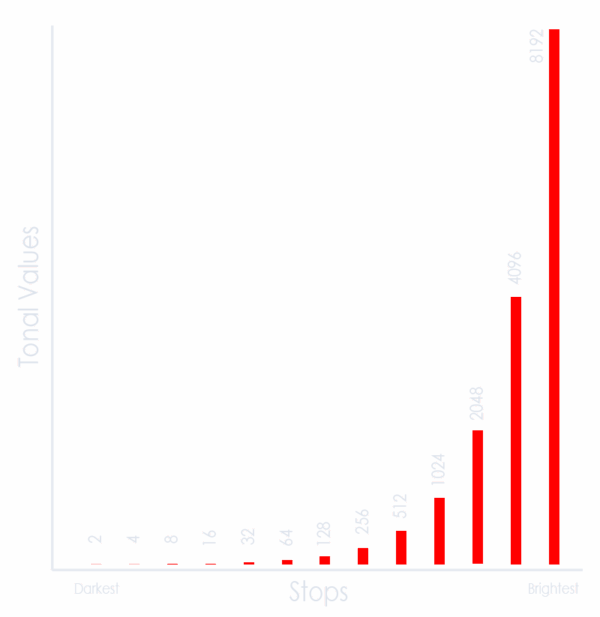
Keep in mind that a stop represents a doubling or halving of light. So the brightest stop gets half of the possible tonal values. In this case, 8192. The second brightest stop gets 4096. The third brightest, 2048. Each subsequent stop receives half of the remaining tonal values. The darkest stop gets only two tonal values.
Digital Noise – What is it and How it Affects Image Quality
In a general sense, noise is aberrant pixels. These pixels do not accurately depict the color or exposure of their portion of the image.
Digital noise is more pronounced in darker portions of a photograph. The darker the shades, the more apparent the noise becomes. This is because the signal-to-noise ratio is low. (You can read more about noise in digital images in this article by Cambridge in Colour). When we brighten an image in post-processing, the noise becomes brighter and more noticeable.
The example images below were shot in sequence, starting with a properly exposed shot. The following photos were intentionally underexposed by 1, 3, and 5 stops. In Lightroom, I used the exposure control to bring the three underexposed images to the correct brightness. What you\’ll notice is that as the amount of underexposure becomes greater, the noise becomes more pronounced.
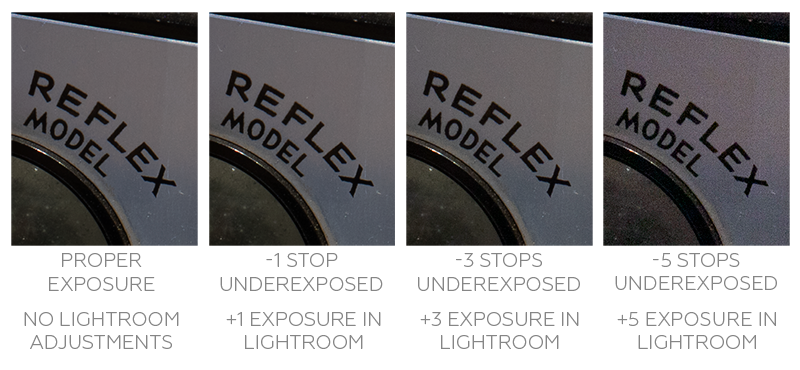
One of the goals of the ETTR technique is to reduce, or hopefully eliminate, noise in our final images.
Shooting
Shoot in Raw
To take advantage of this technique, you must shoot in RAW. This way, you are working with the greatest amount of data possible. All this digital information is also unprocessed. The RAW format provides the greatest latitude for making adjustments.
Enable Exposure Tools
Your camera provides two important tools for adjusting the exposure settings: the histogram and highlights. You may need to enable one or both of these on your camera. Almost all digital cameras offer both as playback display options. On some cameras, the live-view shooting mode displays a real-time histogram.
The Histogram
If you’re unfamiliar with the histogram, this webpage provides an excellent introduction: The Histogram Explained.
Highlights
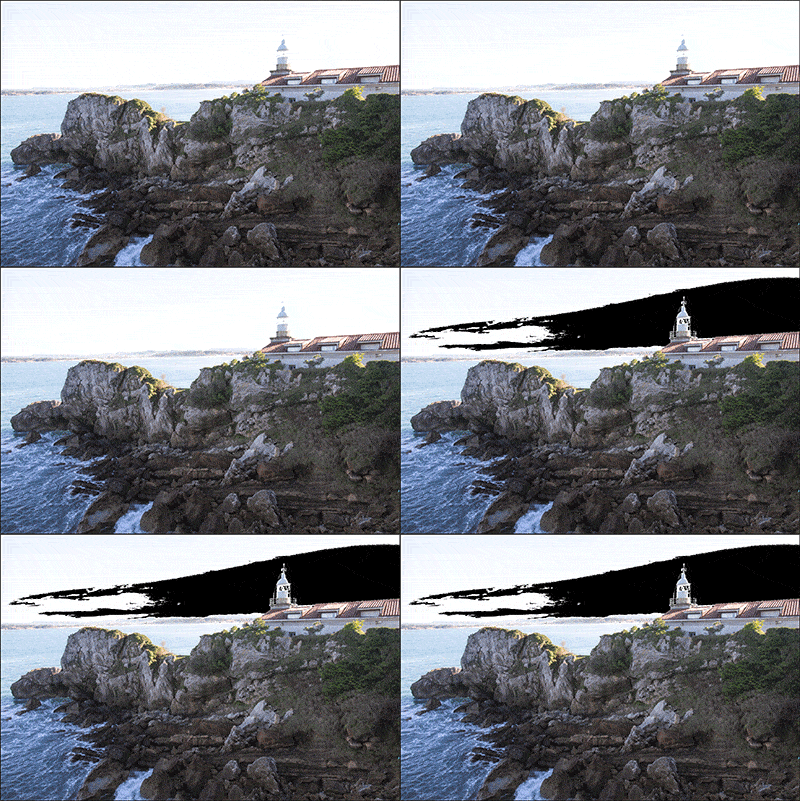
The highlights visually indicate overexposed areas of the image, approaching the point of no return. In playback mode, you might notice that portions of the image ‘blink’, typically in black-and-white or red-and-white. The blinking areas indicate blown-out highlights. This means they have become so overexposed that all detail is lost, leaving them completely white. It is highly unlikely that you can recover these areas, even with advanced Photoshop work.
The Shooting Technique
What you do is overexpose the image, but not too much. The key is to overexpose as much as possible without blowing out or clipping any part of the photograph that matters.
This results in a histogram shifted to the right in the chart. This is where the technique gets its name.
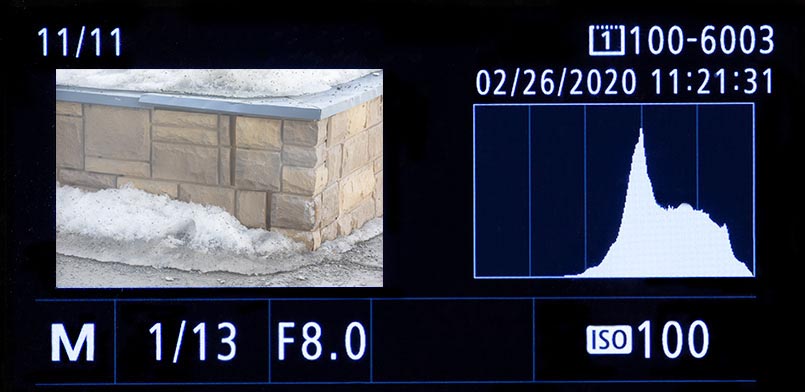
Avoid going too far and blowing out parts of the image that matter. Use both the histogram and the highlights to review your work when shooting. If you notice overexposure during playback, stop down a bit and reshoot. Aim to avoid a spike on the far right of the chart, or any parts of the photo that matter blinking.
Post Processing
Once you import the photos into your processing software, adjust the settings to achieve the exposure you have in mind. You’re pulling the data-rich portions of the image into darker areas. You might be surprised by how much you can adjust the image.
This first photo comes from our recent trip to Santander, Spain. My test shot had an exposure of 1/200 and turned out too overexposed—I noticed a histogram spike on the right and blinking pixels where I didn’t want them. I increased the shutter speed to 1/320 to eliminate both issues.
In Lightroom, I applied a -2 exposure and decreased both the shadows and blacks to achieve the final result. As you can see from the histogram of the final image, I pulled the shadows down enough to create clipping.
-
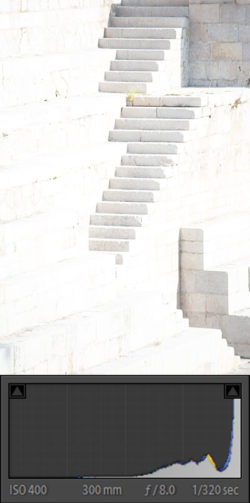
- Straight Out of Camera

-
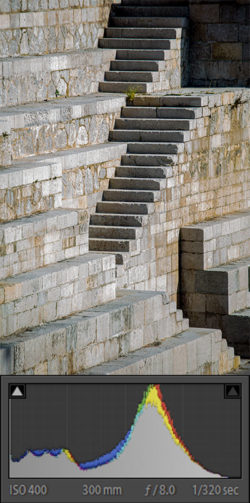
- Adjusted in Lightroom
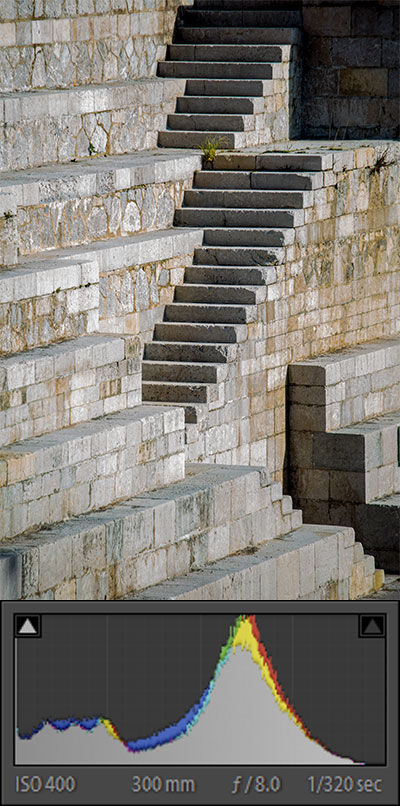
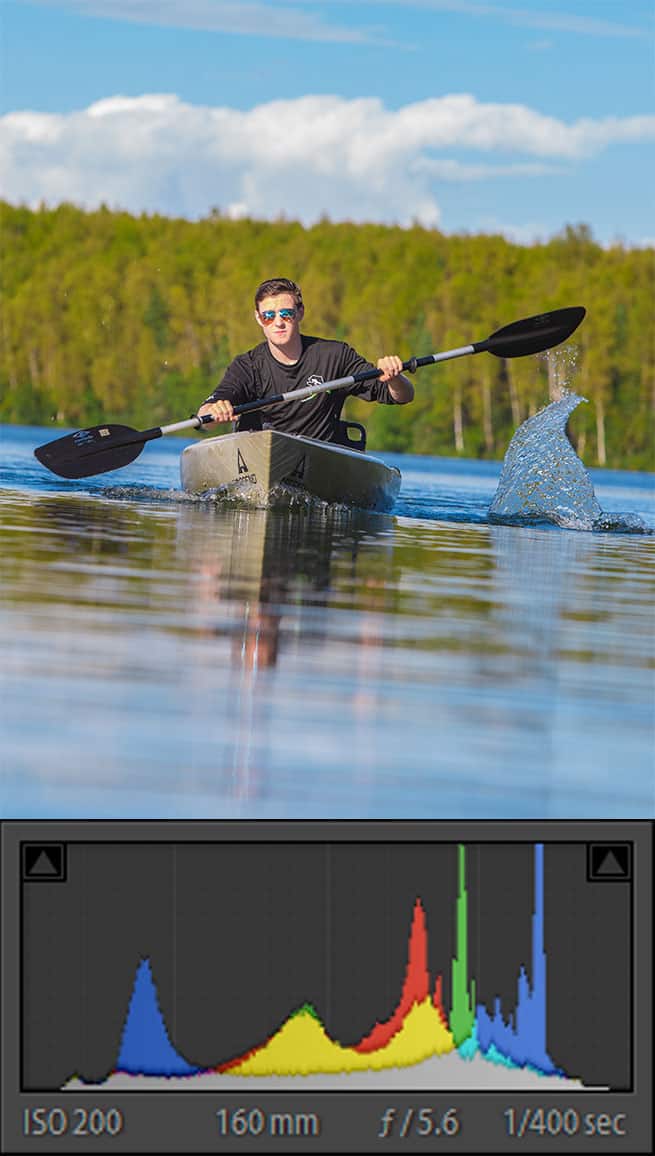
This second photo was taken a while back at Mirror Lake in Chugiak. It was one of a series (about 100) taken using the same exposure settings. Once I had the exposure set, I could shoot until the light changed. Again, I made adjustments in Lightroom to darken the image to the desired result.
-
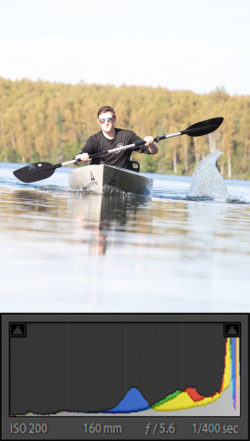
- Straight Out Of Camera

-
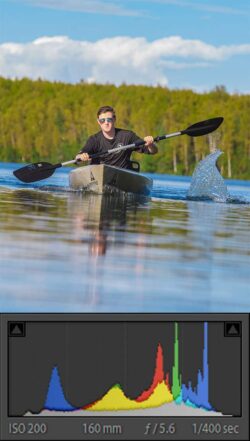
- Kyak-LR-Adj
When ETTR works…..and when it doesn’t
No technique works in all situations. This is true for ETTR. Getting the exposure adjusted correctly can sometimes take several attempts. It takes lots of practice to make these changes quickly.
Rapidly changing lighting conditions can be difficult to handle. On a partly sunny day, fast-moving clouds create alternating bright and shady conditions, making it difficult, and sometimes impossible, to keep up.
If you are photographing a subject that moves through varying lighting conditions (in and out of shadows into bright light), it can be just as difficult as trying to keep up with a partly sunny day.
Any circumstance that requires you to make a quick exposure decision makes ETTR difficult to use. Some examples would be weddings, wildlife, and outdoor sporting events.
When your histogram results in large peaks very close to the right-hand edge of the chart, your image can suffer a loss of delicate colors. This can happen with the faint pastel pinks and oranges in clouds around sunset. Read this article by Joaquin Baldwin for a detailed explanation of why this happens.
Conclusion
ETTR is just one of many shooting techniques available to digital photographers. Although I find it great for landscapes, cityscapes, and most portraits it doesn’t work all the time. But since these three subjects make up the majority of the photos I create, it is the technique I use most often.
Other techniques I use are ISO invariance and exposure bracketing. Look them up and give them a try as well.
Thanks!
March 26, 2020 @ 8:29 pm
Thank you for this! Really appreciate all the great tips shared. You went over this in your flash class last year, but this helps solidify your explanation.
March 26, 2020 @ 8:43 pm
I’m glad you found it helpful. It might be a technique to try and see how it works for you.
March 28, 2020 @ 11:54 am
Kathy, what model camera are you using? With all this spare time on our hands, now might be a good time to experiment with this technique.
March 28, 2020 @ 12:36 pm
I’m shooting with Nikon D500. I will definitely turn the blinkies on & try this!